
The New Microsoft Teams Phishing Scam
Kalamazoo, MI | February 10th, 2026
This article at a glance:
- There's a new vishing scam targeting businesses through Teams.
- Scammers are calling victims and pretending to be IT support.
- By staying aware of 3 red flags, you can protect yourself from vishing.
Microsoft Teams users need to watch out for an new wave of scams: voice-phishing.
Voice-phishing (A.K.A. vishing) is a scam where a scammer calls you in an attempt to manipulate you into giving out sensitive information.
And that’s not all. These scammers are actually hand-selecting their victims.
But how does it work? And who’s getting targeted?
Here’s what you need to know.
How the Teams Scam Works (In a Nutshell)
Fundamentally, the scam works like this:
The scammer combs through publicly available information to find key employees at an organization (generally, employees without an IT background).
The scammer then changes their name on Teams to “Help Desk” or even the name of an IT specialist at the victim’s company.
The victim sees a call from their IT department, and answers it—but it’s actually the scammer on the other line.
The scammer says there’s an urgent issue with the victim’s computer.
The victim gives control of their computer over to the scammer using Quick Access.
The scammer stealthily installs a virus to gain access to the victim’s computer.
And just like that, the victim (and the company) are compromised. The scammer ends the call with a thank-you, and the victim has no idea they were just hacked.
3 Warning Signs: What to Look Out For
On the surface, this scam feels like it’d be pretty hard to catch. But if you look out for these red flags, you can protect yourself.
Warning Sign #1: Their Email Address is Suspicious
The classic example of a scam is a suspicious email address. To check it, just click on their Teams profile and check their email.
But a word of advice: the suspicious part won’t just be the username, but the domain name.
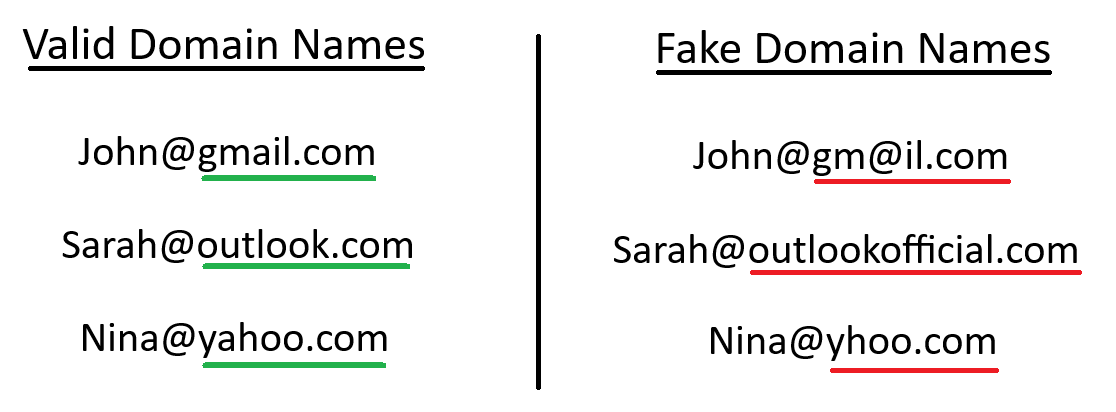
Examples of how scammers mimic official domain names.
Scammers know that a phony domain is a dead giveaway, so they create domains that look legitimate but aren’t.
Usually, scammers will add a word to a popular domain name, or replace or remove a letter in it to make the change look subtle.
Warning Sign #2: It’s Urgent (But Secret)
Scammers like to pressure you into making urgent decisions. By making you feel stressed or anxious, it’s easier for them to get you to do what they want.
At the same time, they don’t want you to double-check with anyone else.
Stay aware of language like this:
Immediate Action. “There’s an immediate problem, and you absolutely have to fix it right now.”
Threats of Consequences. “If you don’t fix the problem, you’ll be fired, fined, or even face legal action.”
Secret-Keeping. “If you tell anyone else about this, then you’ll only be making the problem worse.”
Sometime between mid-February and March, Microsoft will be releasing a new feature: trust indicators. Trust indicators are small icons that will appear next to your Teams contacts' names, immediately telling you if a contact is trustworthy or not. For more information, read all about it here.
Warning Sign #3: The Call Just Feels Suspicious
If you feel like a call is suspicious, then trust your gut.
Almost anything can tip you off to a scam call, even if it’s as minor as:
Bad audio quality from the caller
Strangely vague questions and answers
Being told you have a virus, even though you didn’t report a problem
If any of these feels true, then just hang up the call. Because here’s the thing to remember: if it’s really your IT department, you can just call them back.
How to Respond to a Vishing Attempt
If you receive a suspicious call from Help Desk, then don’t answer. Instead, just follow these steps.
Hang Up Immediately
Don’t ask questions, give excuses, or wait—if you receive a vishing call, just hang up the phone.
A vishing scammer will use every second they have with you to try and manipulate you into doing what they want. So, don’t wait to hang up: end the call first and ask questions later.
Report to Your IT Department
After you’ve hung up, immediately inform your IT department of the vishing attempt. To help them respond to the incident, take note of the following information:
Caller ID
The caller’s email address
Time of call and call length
If you remember, also write down what they said to try and get access to your computer. If they had information that only an employee or client should know, then that may indicate a breach somewhere else in the company.
What to Do if You Fell for Vishing
If you were tricked by a vishing scam, then you need to act quickly. Contact your IT department immediately and tell them what happened; they’ll know the best way to respond.
Do not attempt to handle the security incident yourself. These vishing scams work by deploying a virus to your computer, which acts fast to infect your (and your coworkers’) systems. Even if you managed to stop it on your computer, only an IT professional could assess the damage and begin to fix it.
If the Scammer is Currently on Your Computer
If the scammer is currently wired into your computer through an app like Quick Assist, then sever their connection immediately. You can do this by clicking “Cancel control.”
If you’re not using Quick Assist or can’t cancel control for some reason, then force a shutdown on your computer by pressing the power button for 5-10 seconds.
Protect from Vishing with a Managed Security Provider
Here’s the truth: protecting yourself from every cybersecurity threat just isn’t possible. After a long enough time and enough phishing attempts, there will be a breach somewhere.
That’s why you need IT professionals in your corner.
When you work with Omega Computer Services, our team of IT professionals protects you with security essentials like:
Daily data backups
On-call IT support
Firewalls, breach rep, and threat reporting
For help keeping you and your company safe from phishing and vishing scams, click here to contact our team today!
-
Phishing is the practice of sending fraudulent messages (usually claiming to be from a well-known company) in order to trick someone into revealing sensitive information. Read more here: Top 5 IT Risks for SMBs.
-
If you have Windows, then yes.
Quick Assist is a built-in software for Windows computers, which lets you take control of another person’s computer to troubleshoot tech issues. It’s important to only let trusted IT professionals use Quick Assist on your computer, since scammers use it to install viruses on your computer.
-
Vishing and smishing are both a type of phishing. With vishing, scammers verbally try to manipulate victims. Meanwhile, smishing uses SMS (or texting) to try and manipulate you.
