
Integrating AI Into Your Workflow
Kalamazoo, MI | May 27, 2026
This article at a glance:
- An MIT study identified how AI increases productivity.
- AI chains are changing workflows everywhere.
- Many workers can implement AI chains on their own.
You’re probably using AI already. But is it really helping you?
An MIT study published in February reviewed how different professions implemented AI into their workflows. This is what they found:
There is one best strategy for integrating AI into a workflow
AI’s usefulness is dependent on workflow
AI is usually unhelpful at first, with massive productivity spikes later on
Let’s take a look at each of these findings (and some examples) to answer the question: how can you integrate AI into your workflow?
AI Chains: The Key to AI Productivity
The authors of the MIT study, “Chaining Tasks, Redefining Work: A Theory of AI Automation,” found that AI can massively increase productivity.
But there’s a catch.
AI only makes a meaningful difference in productivity when you outsource entire steps of your workflow. In other words, it’s not enough to use ChatGPT or Claude to help you complete tasks. Instead, you need to learn how to outsource entire tasks in your workflow to AI. The researchers refer to this as AI Chaining.
In an AI chain, an AI takes the brunt of the labor, and the worker takes on a supervisory role.
Let’s use an example.
Imagine you’re a doctor, and you have an appointment coming up. During your appointment, you have to:
Take notes on what the patient said
Structure and revise those notes after the appointment
Chart patient information into a database
Review all notes and charting before finalizing
Not-so-fun fact: doctors spend so much time charting, most are forced to do “pajama time,” or off-the-clock notetaking for up to 15 hours each week. I hope you have some comfortable PJs!
But you value your time. So instead, you use an AI chain, outsourcing all parts of a workflow except the final review process.
Now, your process looks more like this:
AI records and transcribes the appointment
AI structures and cleans up the notes
AI charts patient information
You review all notes, make some edits, and finalize
Through AI chaining like this, doctors everywhere are saving hours of their time and increasing the quality of care they give to patients. No more pajama time for you!
But that leaves us with the question: how do you set up an AI chain?
How to Set Up an AI Chain Workflow
The MIT researchers recommend a specific method for setting up an AI chain. But before we explore it, there are three terms you need to know:
Manual Step: An entirely human-completed task.
Augmented Step: A combined human and AI task.
Automated Step: An entirely AI-completed task.
With these terms in mind, you can start building an AI workflow by following this method:
Break down your current workflow for a task into steps.
Identify a manual step that could be automated.
Continually augment that step with AI until it can be fully automated.
Repeat.
Feeling confused? Let’s take a look at how this would play out in our doctor example:
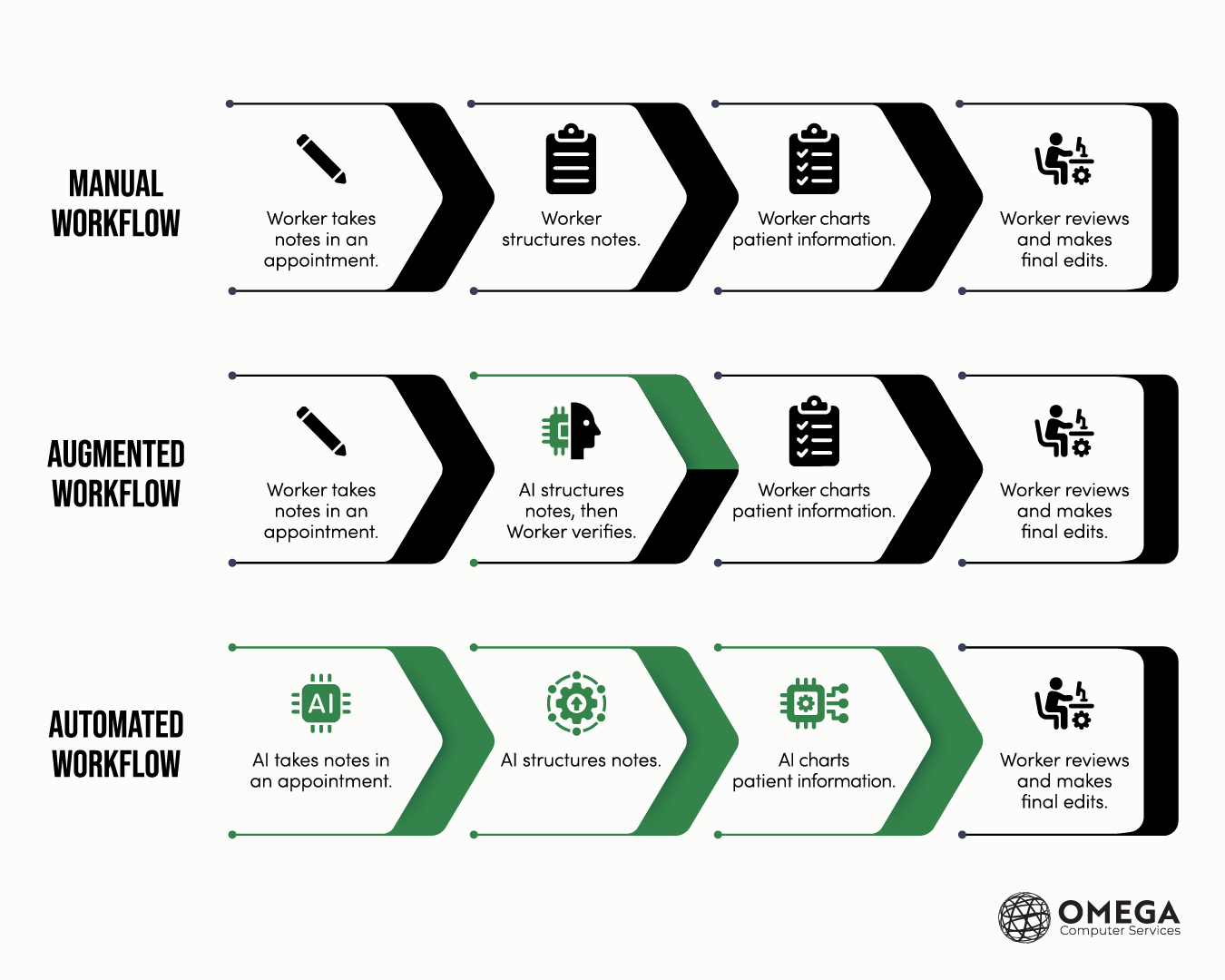
Instead of automating each task at once, the doctor begins by augmenting one step: structuring notes.
Then, only after a step has been augmented enough to be fully automated, the doctor moves on to automating the next nearest steps in the chain. But ultimately, the final step must always be a review and verification from a human professional.
If you take one thing away from this article, let it be this: successful AI chains require consecutive, automated steps that end with a human review.
That way, your AI does each step in quick succession and you only have to review one output.
How Are Other Professions Using AI?
So, we explored how a healthcare worker—such as a doctor—might use AI to increase their workflow. But what about other professions?
Here are some examples:
Software Engineers (ChatGPT, Claude). Generate boilerplate code, debug code, explain unfamiliar codebases.
Project Managers (Notion AI, Atlassian AI). Summarizing meeting, creating notes, generating action items, identifying “task owners.”
HR & Recruiting (Carv, Lever). Scheduling interviews, automating notes, processing requests.
Students (Claude, Gemini). Summarizing lectures, structuring notes, highlighting key points, creating AI-generated podcasts to explain difficult concepts.
Streamline Your Workflow with an MSP
AI isn’t the future, it’s the present. And as time goes on, you’ll be working with it more and more.
For help navigating IT and software solutions for your workplace, click here to contact our team at Omega Computer Services today!
